
Top 5 Adobe Illustrator Alternatives for Designers in 2026


 6 min. read
  Updated on

Adobe Illustrator is one of the most powerful tools for vector graphics, but it comes at a cost and requires a subscription. If you are looking for something more affordable or easier to use, this guide offers some of the best alternatives that deliver strong design features without the same commitment.
Table of contents
What are the best Adobe Illustrator alternatives to use?
1. Inkscape – Completely Free and Open Source
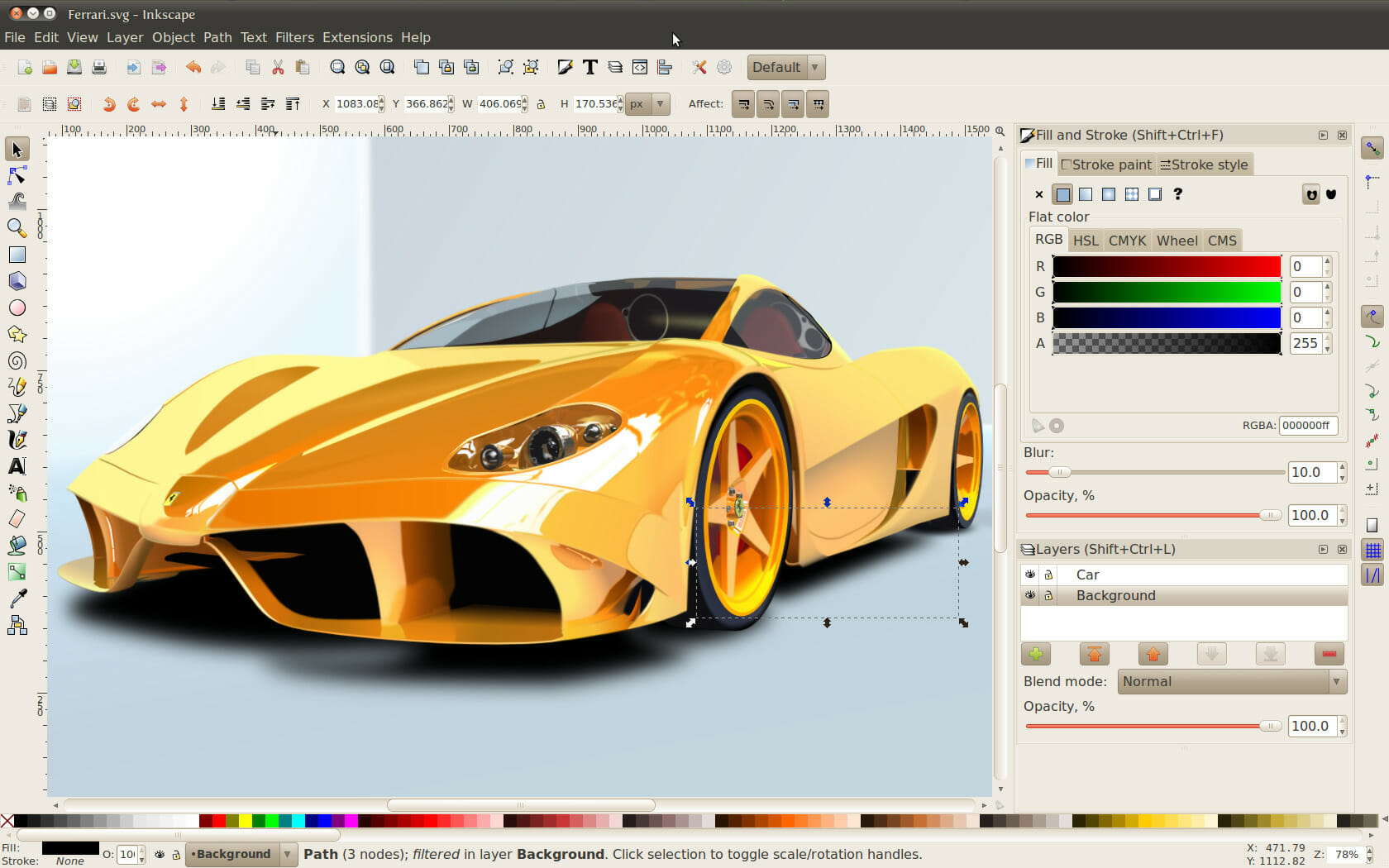
Inkscape is one of the most popular free alternatives to Adobe Illustrator. It is an open source vector graphics editor that works seamlessly across Windows, macOS, and Linux. With a strong focus on professional design tools, it provides everything from advanced path operations to bezier and spiro curves, making it suitable for both beginners and advanced designers.
If you are debating whether to switch, this detailed comparison of Inkscape vs Illustrator shows how close the two are in terms of features and usability. Since it supports a wide range of file formats, including SVG, AI, EPS, and PDF, Inkscape easily fits into most design workflows.
Other great features:
- Free and open source
- Multi platform support on Windows, macOS, Linux
- Advanced path and node editing
- Wide file format compatibility
- Active community with frequent updates
2. CorelDRAW Graphics Suite – Full Professional Design Package

CorelDRAW Graphics Suite is a premium vector illustration tool that stands out as a direct competitor to Illustrator. It offers powerful tools for layout, typography, and photo editing, making it an all in one design solution. Many professionals in branding, print, and digital design prefer it for its intuitive workflow and industry grade capabilities.
The suite also includes AI powered features that make design tasks faster and easier. Its LiveSketch tool, for instance, can intelligently interpret freehand sketches into precise vector curves. This makes CorelDRAW particularly appealing for designers who want a balance of creativity and technical precision.
Other great features:
- AI powered LiveSketch
- Comprehensive design suite for vector, photo, and layout
- Advanced typography tools
- Excellent print and web design support
- Smooth learning curve for Illustrator users
3. Affinity Designer – One Time Purchase, No Subscription

Affinity Designer is another powerful Illustrator alternative that has gained popularity among professionals for its speed and affordability. Unlike subscription based software, it comes with a one time payment, making it cost effective without sacrificing features. The software offers a clean and modern interface with both vector and raster editing options.
Its ability to handle heavy files and complex designs without lag makes it attractive for digital artists and UI or UX designers. Affinity Designer also provides a seamless workflow between desktop and iPad, giving creators the freedom to work across multiple devices. If you need guidance, you can also check tools recommended in this vectorize image software roundup.
Other great features:
- One time purchase with no subscription
- Vector and raster design modes
- Cross platform on Windows, macOS, and iPad
- Non destructive editing
- Snapping and precision alignment tools
4. Vectr – Simple and Cloud Synced Design Tool

Vectr is a lightweight free alternative to Illustrator designed for users who want an easy entry into vector graphics. It works both as a desktop app and directly in the browser, making it accessible without heavy downloads or steep learning curves. Its clean interface is beginner friendly while still offering essential vector design capabilities.
One of Vectr’s standout features is its real time cloud syncing. Projects are automatically saved online, making collaboration seamless across devices. This is useful for teams or freelancers who need to access designs quickly and share them with clients. If you prefer browser based workflows, you can also explore more online vector graphics editors.
Other great features:
- Free to use with online and desktop versions
- Real time collaboration and cloud sync
- Cross platform access on browser, Windows, Linux, macOS, ChromeOS
- Intuitive and beginner friendly interface
- Scalable vector editing with instant preview
5. Sketch – Best for UI and UX Design on macOS

Sketch is a design tool built primarily for macOS users that specializes in UI and UX design. While not as feature rich in print and illustration as Illustrator, it excels in creating modern digital interfaces. It is widely adopted by app and web designers due to its streamlined workflow and strong prototyping tools.
The software integrates smoothly with collaboration platforms, enabling teams to design, test, and refine projects efficiently. Its plugin ecosystem allows customization to fit many workflows, making it a versatile tool for UI or UX professionals.
Other great features:
- Optimized for UI and UX design
- Lightweight and fast on macOS
- Prototyping and real time collaboration tools
- Strong plugin ecosystem
- Widely used in web and app development
Conclusion
The right Adobe Illustrator alternative depends on your design needs, and you can also check this guide on how to download Illustrator for free trial before you decide. Inkscape works well as a free solution, CorelDRAW and Affinity Designer offer premium level tools, Vectr handles quick cloud based edits, and Sketch remains the top pick for Mac based UI or UX work.
FAQs
Yes. Inkscape is free, open source, and offers powerful vector editing tools that cover most of Illustrator’s core features.
CorelDRAW and Affinity Designer are top choices for professionals because they provide advanced features for print, branding, and digital design.
Yes. Vectr works both online and offline, and you can explore other options in the list of online vector graphics editors.
Sketch is widely considered the best option for Mac users, especially for UI and UX design projects.
Many of them, including Inkscape, CorelDRAW, and Affinity Designer, can open and export Illustrator file formats such as AI, EPS, and SVG.

Read our disclosure page to find out how can you help Windows Report sustain the editorial team. Read more


Improve this guide


User forum
0 messages