
Error Cant Wait 554 (0x22A): Fix it With 3 Steps
This issue usually affects qBittorrent software


 2 min. read
  Updated on

Sometimes you can encounter an ERROR_CANT_WAIT error, and it will prevent you from using certain applications. However, there are ways to fix this issue, and today we’re going to show you how to do it.
How can I fix ERROR_CANT_WAIT?
1. General solutions to try
- Ensure that the application that is giving you the error is up to date.
- Temporarily disable your Avast Antivirus. You can do that by going to Protection > Core Shields and then disabling the feature. Other antivirus tools can also cause this problem.

- If you’re using Serviio or any other software that is scanning the folder, disable them.
- Instead of using HDD for storage, set SSD as the destination drive.
This issue has been reported in qBittorrent, and apparently, the issue appears when different software is accessing files that are being downloaded.
2. Change the number of max connections
- Open qBittorrent and go to Options.
- Next, go to the Connection section.
- Try lowering the number of max connections. Users reported going from 500 to 420, but adjust it according to your current values.

- Save changes.
3. Create a zip file of your torrent and delete the original
- Pause the torrent.
- Navigate to the download location.
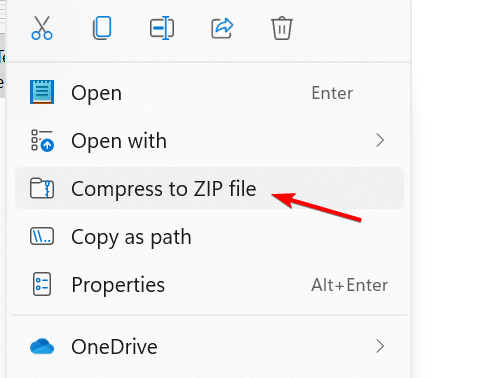
- Locate the torrent files, select them all, right-click, and choose Compress to ZIP file.
- Delete the original files while keeping the archive.
- Lastly, unzip the files from the archive in the original location.
This is a workaround, but it works according to users, so you might want to try it.
ERROR_CANT_WAIT also comes with 554 (0x22A) Used to indicate that an operation cannot continue without blocking for I/O message, so you can easily recognize it.
In the past, we covered similar issues in our ERROR_THREAD_NOT_IN_PROCESS and ERROR_IO_PRIVILEGE_FAILED, so feel free to check them out.
Another error code that you can get is ERROR_VALIDATE_CONTINUE, and we wrote more about it a dedicated guide, so don’t miss it.

Read our disclosure page to find out how can you help Windows Report sustain the editorial team. Read more


Improve this guide


User forum
0 messages