
Error Cantscrollbackwards 771 (0x303): How to Fix it
Modifying your SQL query can fix this issue


 2 min. read
  Published on

ERROR_CANTSCROLLBACKWARDS is a programming error and it usually occurs when using database queries. However, there are ways to fix it, and today we’re going to show you how to do it.
How can I fix ERROR_CANTSCROLLBACKWARDS?
1. Use STATIC or KEYSET when querying
- Locate your query.
- Change it so it uses STATIC or KEYSET instead of FORWARD_ONLY.
- The query should look like this:
DECLARE cursor_name CURSOR STATIC FOR SELECT * FROM TableName;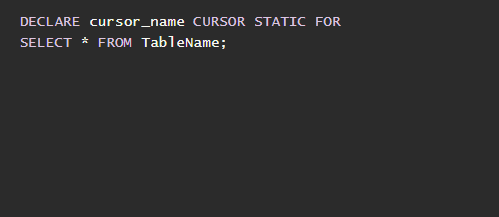
- Save changes and check if the problem is resolved.
2. Other tips to use
- Ensure that you’re using the latest version of the database driver to avoid any issues.
- Use pagination so you can avoid processing large amounts of data.
- Avoid operations that require scrolling backward through the result set.
- Optional: Fetch all results to memory and manually navigate it. This only works for smaller datasets.
- If you’re working with a programming language, ensure that the library or framework you’re using supports backward scrolling.
As for ERROR_CANTSCROLLBACKWARDS, you can also recognize it by the following message: 771 (0x303) The data provider cannot scroll backwards through a result set.
This is a developer error, and unless you’re working with SQL databases or developing software, it’s rather unlikely that you’ll ever encounter it. But if you do, you’ll need to optimize your code and query to fix it.
This isn’t the only database issue, and we wrote about ERROR_DRIVER_DATABASE_ERROR and Arithmetic Overflow Error Converting Expression to Data Type INT in our previous articles, so don’t miss them for more information.

Read our disclosure page to find out how can you help Windows Report sustain the editorial team. Read more


Improve this guide


User forum
0 messages