
ODBC Driver 17 For SQL Server: How to Install And Fix Issues


 2 min. read
  Published on

The ODBC Driver 17 for SQL Server allows Windows applications to connect seamlessly to SQL Server databases. It is required for many business apps and BI tools. Below, we explain how to install it and what to do if you face errors.
How do I install the ODBC driver 17 for SQL Server?
Table of contents
1. Download the driver
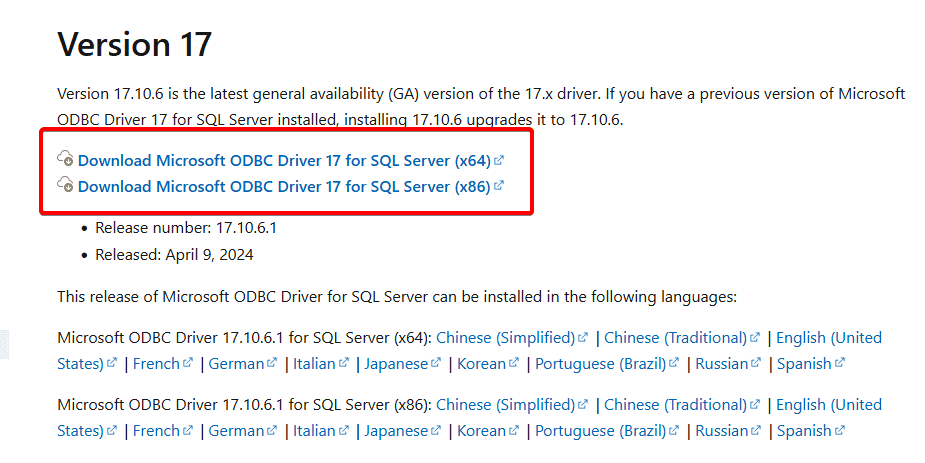
- Go to Microsoft’s official download page for ODBC Driver 17.
- Choose the right installer based on your system: x64 or x86.
If you also work with Oracle databases, see this guide on how to install Oracle ODBC driver on Windows 10 for additional reference.
2. Run the Setup
- Double-click the .msi package you downloaded.

- Follow the on-screen installation wizard.
- Accept the license terms and select the installation folder.
3. Verify the installation
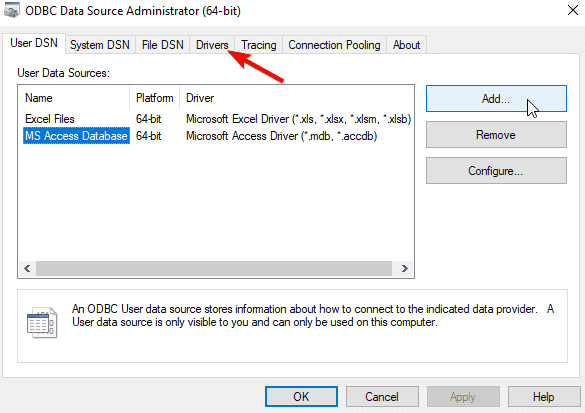
- Open the ODBC Data Source Administrator from Windows search.
- Under the Drivers tab, confirm that ODBC Driver 17 for SQL Server is listed.
Fixing Common ODBC Driver 17 Errors
Sometimes, after installing the driver, users encounter connection or compatibility problems. These can appear when connecting from older applications or after a Windows update.
- Restart your PC after installation.
- Ensure SQL Server is properly installed and running. If not, you can follow this step-by-step SQL Server 2019 installation guide for Windows 11
- Update Windows to get the latest security and system compatibility patches.
If you still face issues, see the troubleshooting tips for Windows 10 ODBC errors that can help resolve driver or registry conflicts.
Why Use ODBC Driver 17 for SQL Server?
- Broad compatibility with SQL Server 2008 through SQL Server 2022.
- TLS encryption support for secure data connections.
- Unicode support for global applications.
- Works with analytics, reporting, and ETL tools that rely on ODBC connections.
With these steps, you should have the ODBC Driver 17 installed and running properly on your Windows PC. If problems occur, updating your SQL Server and checking ODBC settings usually solves them quickly.

Read our disclosure page to find out how can you help Windows Report sustain the editorial team. Read more


Improve this guide


User forum
0 messages