
Fix Protected Content Not Playing on Windows 11 (Quick Steps)


 2 min. read
  Updated on

Protected content may fail to play in Blu-ray, DVD, or digital TV apps on Windows 11. This issue is linked to Enhanced Video Renderer (EVR) when combined with HDCP or DRM audio protection, but there’s a way to fix it.
Table of contents
What Can I Do If Protected Content Fails in Windows 11?
1. Install the Latest Windows Updates
Keeping Windows up to date ensures you receive Microsoft’s latest fixes for playback stability.
- Click the Start Menu.

- Select Windows Update.
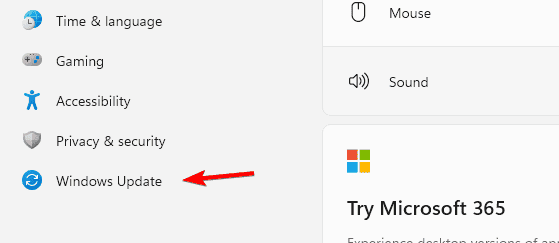
- Click Check for updates.
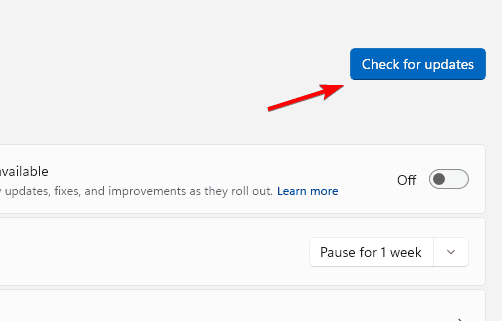
- Install all available updates, including preview build KB5065789.
Microsoft released a partial fix on September 29, 2025, in update KB5065789. It improves EVR with HDCP support, but DRM audio issues are still under development.
Learn more about handling discs with the default DVD player in Windows 11.
2. Copy Content Locally Before Playing
Running files locally avoids network-related glitches that can trigger EVR and HDCP errors.
- If using external or network media, copy files to your PC first.
- Open the file directly in your Blu-ray or DVD app.
- This avoids errors linked to EVR with HDCP.
For related errors, check how to fix protected content when projecting to PC in Windows 11.
Problem Overview
- Apps using EVR with HDCP or DRM for audio can fail.
- Errors include copyright warnings, playback freezes, or a full black screen.
- Only physical media and TV apps are affected, not online streaming.
If you experience sound issues during playback, see this guide on Windows 11 HDMI audio not working.
Affected Versions
- Windows 11 version 25H2
- Windows 11 version 24H2
Why These Fixes Work
Updating Windows ensures you have the partial mitigation for video playback. Copying content locally reduces conflicts with EVR until Microsoft delivers a full DRM solution.
FAQs
It fails due to Enhanced Video Renderer and HDCP or DRM conflicts in Windows 11 24H2 and 25H2.
No. Services like Netflix, Disney+, and Prime Video continue to work.
Partially. Update KB5065789 fixes EVR with HDCP playback, but DRM audio problems remain.
Conclusion
Protected content playback issues in Windows 11 are temporary. Installing the latest updates and using local copies of media help bypass the problem until Microsoft completes the full DRM audio fix.

Read our disclosure page to find out how can you help Windows Report sustain the editorial team. Read more


Improve this guide


User forum
0 messages