
Windows Server 2016 End of Life: Key Dates & Risks


 3 min. read
  Published on

Windows Server 2016 is still widely used in many IT environments, but its support lifecycle is approaching important deadlines. Knowing its end of life (EOL) timeline helps you plan upgrades and avoid security risks.
What should I know about Windows Server 2016 end of life?
Table of contents
Windows Server 2016 exited mainstream support on January 11, 2022. This means no new features, design changes, or complimentary support options are offered. The product is now in extended support until January 12, 2027. During this phase, Microsoft only releases critical security updates and essential bug fixes.
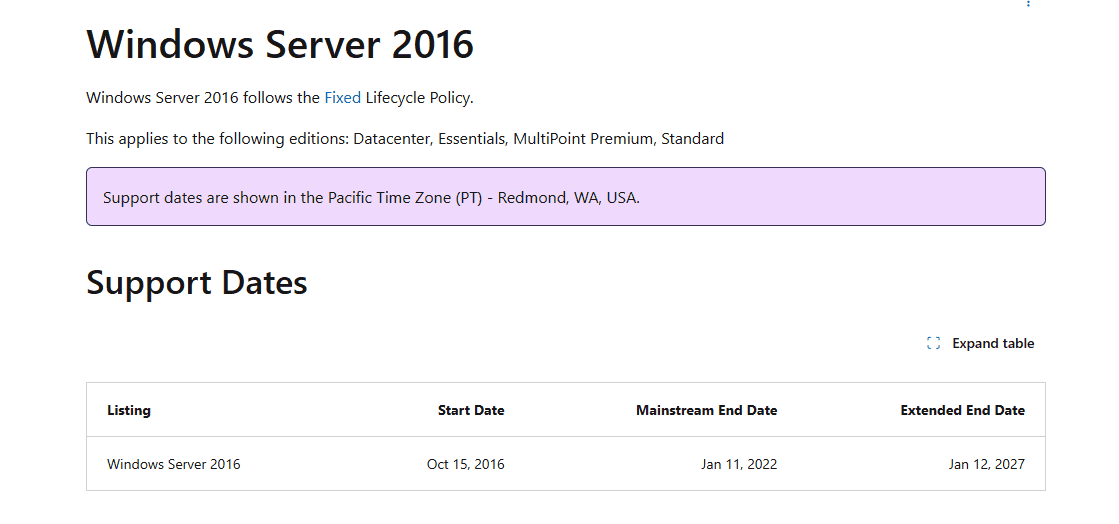
Once extended support ends, Windows Server 2016 will no longer receive any patches. Businesses that continue running it after January 2027 face potential cybersecurity threats, compatibility issues with modern software, and compliance challenges in regulated industries. To avoid these risks, organizations should begin migration planning well before the final deadline.
Why is Windows Server 2016 end of life important?
EOL marks the point where Microsoft stops protecting systems against vulnerabilities. Running an unsupported server operating system exposes networks to malware, ransomware, and data breaches. For enterprises subject to compliance standards such as GDPR or HIPAA, using unsupported software can also lead to legal penalties.
What are the risks of not upgrading?
- No security updates to patch new vulnerabilities
- Higher exposure to ransomware and malware
- Loss of official Microsoft support and hotfixes
- Difficulty integrating with modern applications
- Potential compliance and audit failures
What should you upgrade to?
The natural upgrade paths from Windows Server 2016 are:
- Windows Server 2019 – a stable release with long-term support
- Windows Server 2022 – the latest version with advanced security features and cloud integration
Both provide continued security updates and modern capabilities that can help future-proof your IT infrastructure.
Related resources
- Learn how to dual boot Windows 10 and Windows Server before committing to migration
- See when Windows 11 support ends to align with client OS planning
- Explore the differences between Windows and Windows Server to choose the right edition
FAQs
Mainstream support ended on January 11, 2022.
Yes, but it is not recommended. Running unsupported software increases security and compliance risks.
After 2027, no security updates or patches will be provided, leaving systems vulnerable.
Planning ahead for Windows Server 2016 end of life is the best way to avoid last-minute disruptions. By upgrading early to Windows Server 2019 or 2022, you ensure continued security, compliance, and compatibility for your business-critical workloads.

Read our disclosure page to find out how can you help Windows Report sustain the editorial team. Read more


Improve this guide


User forum
0 messages